

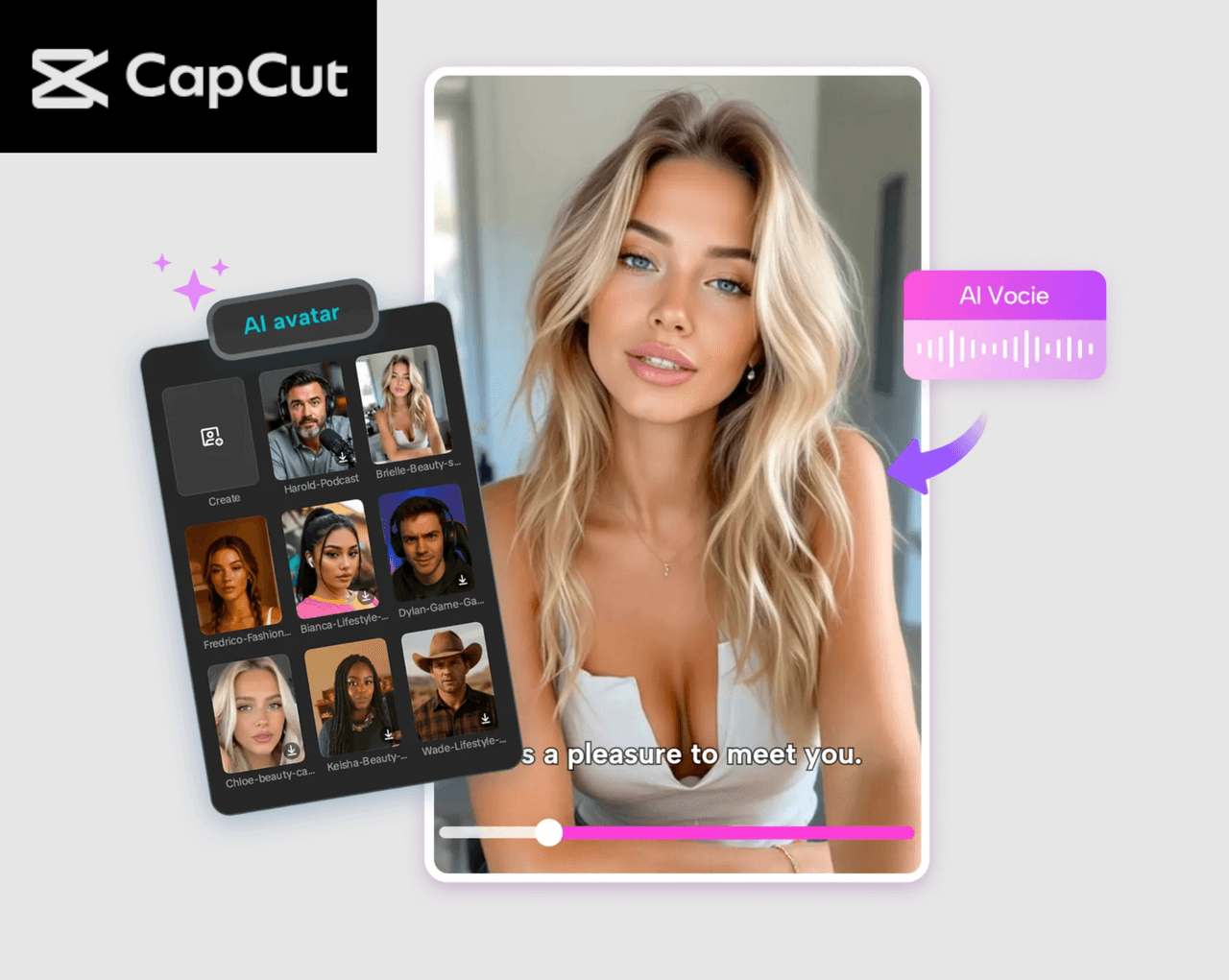
Everyone wants to stand out online. Whether you’re posting on TikTok, building a YouTube channel, promoting your small business, or trying to create a unique digital identity, visuals matter more than ever. And as AI tools become easier to use, creators can build content that feels personal, professional, and eye-catching—without advanced editing skills.
One of the most exciting tools helping people shine online is the CapCut AI Avatar. This feature turns ordinary content into something fun, fresh, and truly scroll-stopping. With just a few clicks, you can create an animated character, apply voice, generate AI videos, and polish your video—all inside the CapCut Desktop Video Editor. If you’ve ever wanted to upgrade your online presence without spending hours recording or showing your face, this guide is perfect for you.
Table of Contents
Why CapCut AI Avatars Make You Stand Out
AI avatars have become popular because they let you create content that’s both visually appealing and consistent. Instead of recording yourself every day, you can build a character that represents your style—and let it do the talking. Here’s why creators love using CapCut’s AI Avatar feature:
1. You get more creative freedom
Instead of worrying about lighting, makeup, or messy backgrounds, you can focus entirely on storytelling. Your avatar becomes your digital spokesperson.
2. It gives shy or busy creators a voice
Don’t feel comfortable on camera? No problem. Your AI avatar handles the visuals, while you guide the script and message.
3. It works for all types of content
Whether you make motivational videos, funny skits, tutorials, book reviews, announcements, or brand content, an avatar adds personality and consistency.
4. You get instant variety
With over 1,000 characters and 150+ AI voices, you can build different personas for different types of content—serious, cute, dramatic, bold, stylish, animated, or fun.
5. It saves a huge amount of time
Recording, retakes, and editing can take hours. A quick avatar generation lets you produce content faster and more often. Now, let’s dive into the exact steps for using the CapCut AI Avatar tool.
6. They Make Your Content instantly Memorable
With over 1,000 characters in CapCut’s library, you can pick avatars that match your vibe—cute, bold, professional, futuristic, animated, or even mythical. When someone scrolls past an avatar video, they immediately stop to see what’s happening. That visual uniqueness alone boosts engagement.
How to Stand Out Online Using CapCut AI Avatar
Step 1: Access the AI avatar
Open CapCut, then navigate to “AI Avatar” > “Avatar Library.” Browse through over 1,000 unique characters and select your favorite to use in your project.
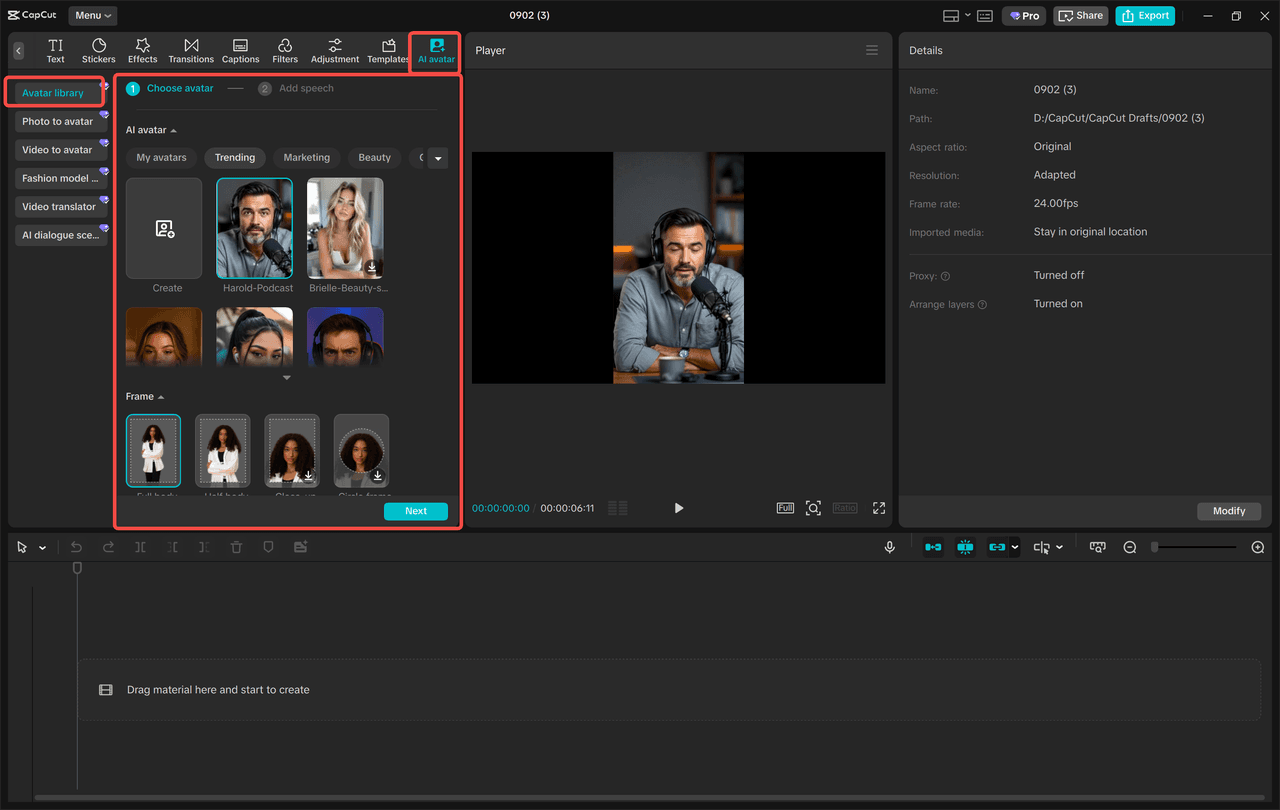
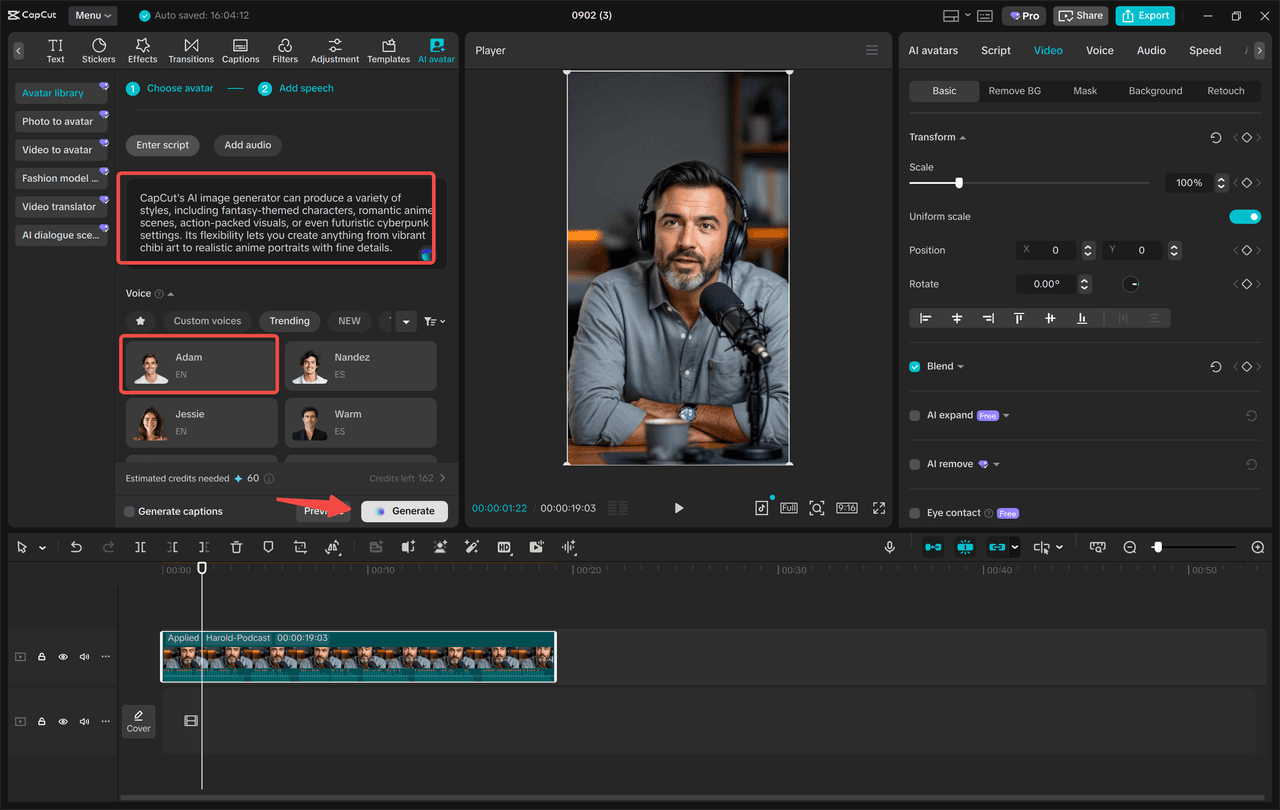
Then, click “Add Speech” to pick from 150+ AI voices and make your character talk. Try the CapCut Text to Speech AI feature to make your video more engaging. Choose a tone that matches your message—funny, emotional, bold, soft, business-like, dramatic, robotic, and more. Finally, click “Generate” to bring everything to life. Your AI avatar is now ready to be used as the main character in your video.
Step 2: Edit your avatar video
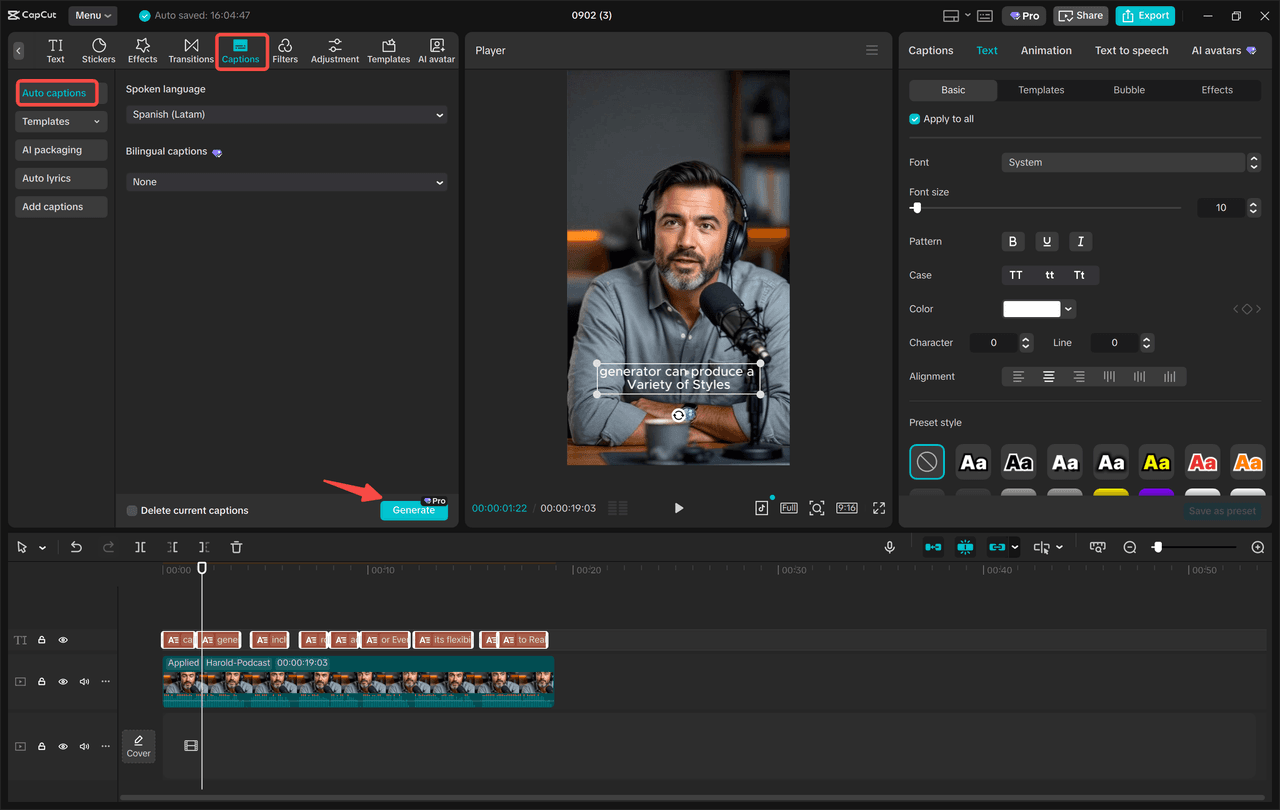
Now that your avatar is generated, it’s time to polish it so it truly stands out. Start by applying Filters to upgrade the overall look. You can boost colors, add cinematic tones, or give the video a specific style—soft, warm, vibrant, neon, or classic. After that, change the background to match your theme. Want a studio backdrop? A city street? A cozy room? A digital scene? CapCut gives you full freedom. Next, add subtitles automatically. Go to “Captions” > “Auto captions” to generate clean and accurate subtitles in seconds. This step not only increases engagement but also makes your content accessible to more viewers.
Step 3: Export your avatar
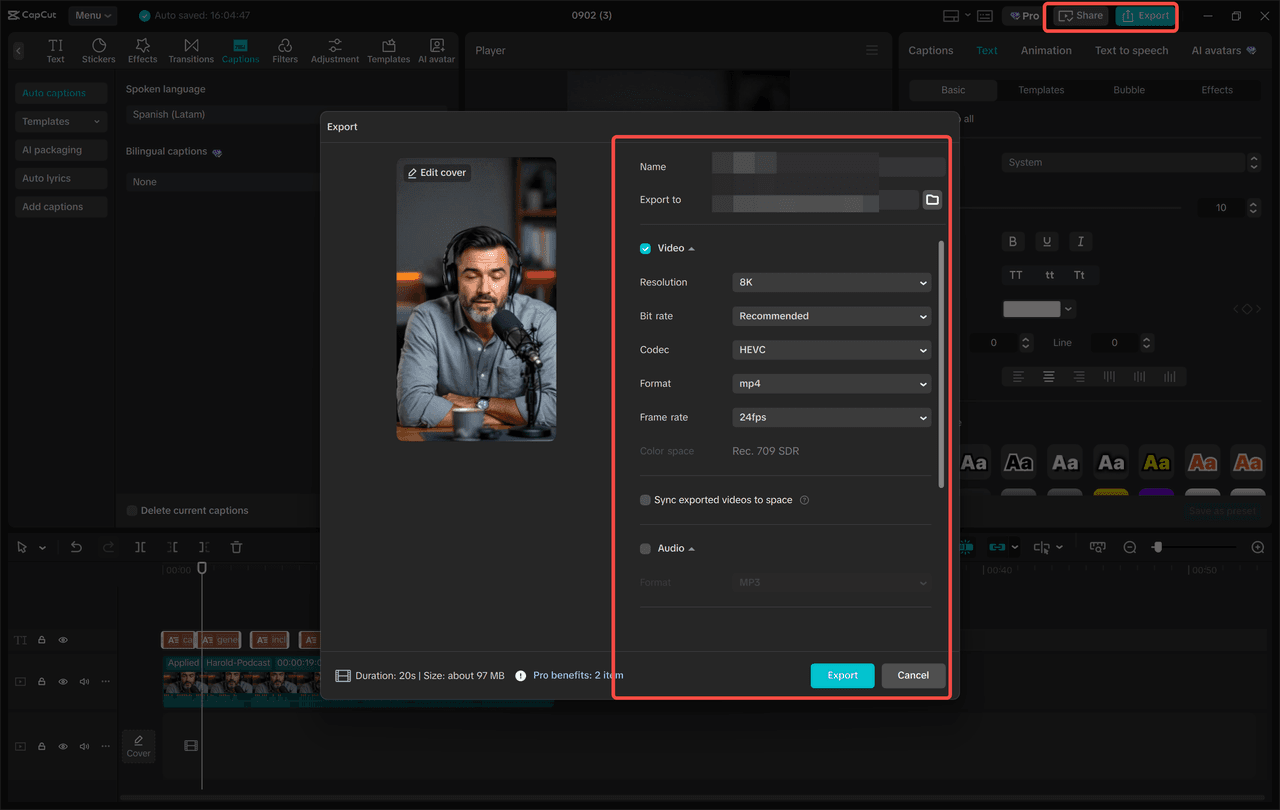
Once your video looks polished and complete, click Export to save your creation. You can save it to your device or share it directly on YouTube or TikTok without leaving CapCut. Let your avatar shine online, entertain your followers, and showcase your creativity. With consistent posting and unique visuals, your AI avatar will help your profile stand out effortlessly.
Why Your Online Presence Will Improve with AI Avatars
Standing out online isn’t about being loud—it’s about being memorable. CapCut’s AI Avatar helps you:
Tell stories without showing your face
Create consistent branding
Produce more videos in less time
Stay creative with endless styles and voices
Build an identity your followers recognize instantly
No matter what niche you’re in—education, entertainment, marketing, reviews, or personal branding—AI avatars give you a refreshing way to connect with your audience.
Conclusion
If you’re looking for a simple, creative, and fun way to grow online, CapCut’s AI Avatar feature is one of the best tools you can start using today. With zero filming required, unlimited character options, and fast editing tools, you can create polished videos that stand out in any feed. Start experimenting with different characters, voices, and backgrounds—and discover your digital persona that shines on every platform.