

AI image generation becomes more predictable when you understand how to guide the creative process. Better results come from clear instructions, controlled visual choices, and purposeful refinement. Whether you create marketing graphics, concept art, or social content, strong prompts help the system interpret your ideas more accurately. An effective AI image generator workflow combines descriptive language, thoughtful adjustments, and consistent visual direction to turn simple concepts into polished images that match your intended style, composition, and message more accurately.
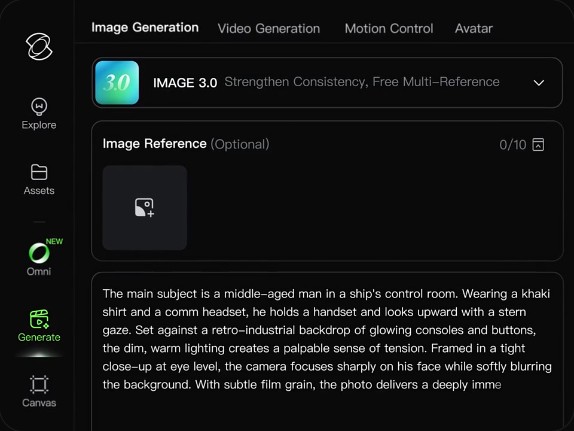
Table of Contents
Write Prompts That Give the AI Clear Visual Direction
Describe the Main Subject With Specific Visual Details
Start by defining the main subject with details that help the AI understand exactly what to create. Instead of writing “a car,” describe the model type, color, materials, condition, and unique features. Mention important visual elements such as clothing, facial expressions, objects, or actions. Specific descriptions reduce ambiguity and give the image model a stronger foundation. Clear subject information also makes later edits easier because you know which details need adjustment during the creative process.
Add Setting, Mood, Style, and Creative Context
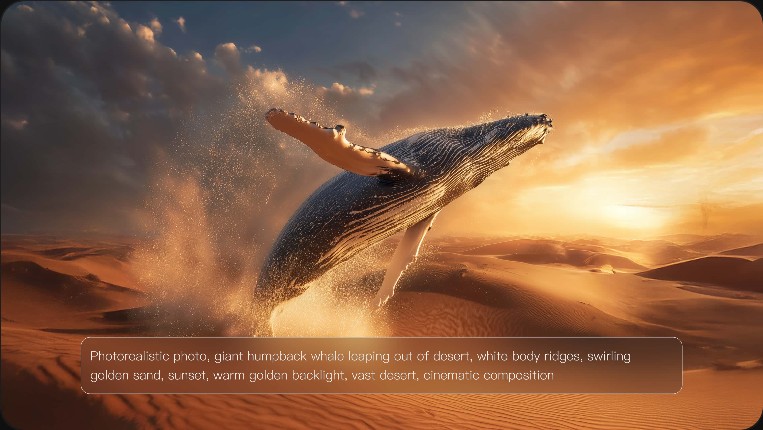
A strong prompt should explain more than the subject alone. Add information about the environment, atmosphere, artistic direction, and emotional tone. Describe whether the scene feels futuristic, peaceful, dramatic, or playful. Include relevant style references such as cinematic, watercolor, minimalist, or realistic. These details help the AI understand the broader creative context and produce images that feel intentional rather than randomly generated. They also provide a clearer direction for achieving a specific visual goal.
Remove Conflicting Instructions and Unnecessary Prompt Clutter
Remove instructions that compete with each other or add unnecessary complexity. Conflicting requests, such as asking for both a dark mood and bright cheerful lighting, can reduce image consistency. Focus on the most important elements and organize details logically. Avoid adding unrelated descriptions that distract from the main idea. A concise prompt with clear priorities usually provides stronger guidance than a long list of disconnected requirements. Well-structured prompts make the AI’s interpretation more focused.
Control Composition, Lighting, and Visual Style
Define Framing, Perspective, and Subject Placement
Composition choices influence how viewers experience an image. Specify framing, camera angle, perspective, and subject placement to guide the final arrangement. Mention whether you want a close-up, wide shot, overhead view, or centered composition. You can also describe foreground and background relationships to create depth. When using an ai image generator, these details help shape the visual structure before adding finer creative adjustments. They allow you to establish the scene’s balance and visual hierarchy more effectively.
Use Lighting and Color to Create the Right Mood
Lighting and color choices create the emotional atmosphere of an image. Describe elements such as soft natural light, dramatic shadows, warm tones, cool palettes, or high contrast. These instructions help establish the feeling you want the viewer to experience. Consistent color and lighting descriptions also improve visual harmony across multiple images, especially when creating a series with a shared theme or brand identity. Thoughtful choices can make visuals feel more cohesive and memorable.
Specify Texture, Detail, and Visual Style Consistently
Texture, detail, and style instructions define the finishing quality of an image. Specify surface qualities like rough stone, glossy metal, soft fabric, or natural skin textures when they matter. Describe the level of detail and the artistic approach, such as photorealistic, illustrated, or stylized. Keeping these choices consistent prevents mixed visual signals and helps create outputs that better match the intended creative direction. Consistent style instructions are especially useful when developing a collection of related visuals.
Refine AI Images Instead of Starting Over
Use Reference Images to Guide the Desired Result
Reference images can provide valuable visual guidance when words cannot fully explain your idea. Use them to communicate composition, color relationships, character appearance, or overall atmosphere. For example, Kling IMAGE 3.0 can be considered when exploring image creation workflows that benefit from clear visual references and creative control. A reference does not replace a good prompt; it works alongside detailed instructions to define the desired result more precisely. This combination helps maintain a stronger connection between the original concept and final output.
Fix Unwanted Elements With Negative Prompts and Targeted Edits
Negative prompts and targeted edits help correct specific issues without rebuilding an image from the beginning. Remove unwanted elements by clearly identifying what should not appear, such as extra objects, incorrect proportions, or distracting details. Focus edits on the problem area rather than changing the entire concept. This approach preserves successful parts of the image while improving the areas that need refinement. Careful corrections can make the final result cleaner and more aligned with your vision.
Change One Prompt Element at a Time and Compare Results
Small, controlled changes make it easier to understand which prompt adjustments improve results. Change one element at a time, such as the lighting, background, or subject detail, and compare each version. This method helps identify effective instructions and prevents confusion during refinement. A structured testing process saves time and creates a clearer path toward the final image you want. Keeping notes on successful changes can also help you build better prompts for future projects.
Conclusion
Creating better AI images requires more than writing a simple description. The strongest results come from combining precise prompts, thoughtful visual direction, and careful refinement. By controlling subjects, composition, lighting, style, and edits, you can guide image generation more effectively. Treat each prompt as a creative framework that communicates your goal clearly. With practice and a systematic approach, you can produce visuals that are more consistent, detailed, and aligned with your original idea. A careful process turns experimentation into a reliable creative workflow.